This page reviews how arrays work in Swift — how to declare them, how to access their elements, and how to iterate over them. It then connects those ideas to the declarative syntax you use every day in SwiftUI.
Declaring an Array
Swift infers the element type from the values you provide, so both of these are equivalent:
Swift provides convenience properties for the first and last elements that return optionals, protecting against the case of an empty array:
print(planets.first ?? "No planets") // Mercuryprint(planets.last ?? "No planets") // Neptuneprint(planets.count) // 8print(planets.isEmpty) // false
Important: Accessing an index that does not exist — for example, planets[10] when the array only has 8 elements — will cause a runtime crash. Always guard against out-of-bounds access when the index is not known in advance.
Iterating with a for-in Loop
When you need to work with every element and do not need the index, iterating directly over values is the clearest approach:
for planet in planets { print(planet)}// Output:// Mercury// Venus// Earth// Mars// Jupiter// Saturn// Uranus// Neptune
Iterating with Indices
When you need to know the position of each element — for example, to display a numbered list or to modify elements in place — iterate over the array’s indices property instead:
for index in planets.indices { print("\(index + 1). \(planets[index])")}// Output:// 1. Mercury// 2. Venus// 3. Earth// 4. Mars// 5. Jupiter// 6. Saturn// 7. Uranus// 8. Neptune
Iterating over indices is the right choice when you need both the element and its position — particularly when you need to mutate elements in place, since planets[index] gives you a direct reference to the stored element rather than a copy.
NOTE
Swift also provides enumerated(), which pairs each element with a counter in a single expression. This is a clean option when you need both values but do not need to mutate the array:
for (index, planet) in planets.enumerated() { print("\(index + 1). \(planet)")}
The difference from indices is subtle: enumerated() provides a counter starting at 0 (which you can offset), while indices provides the actual index positions of the array. For standard zero-based arrays these produce the same results, but indices is the safer and more expressive choice when mutation is involved.
Adding and Removing Elements
For reference, the most common mutations:
planets.append("Pluto") // Adds to the endplanets.insert("Ceres", at: 4) // Inserts at a specific indexplanets.remove(at: 0) // Removes by indexplanets.removeLast() // Removes the last element
Arrays and User Input
In a command-line program, you can build up an array from user input using readLine() and append():
var favouritePlanets: [String] = []print("Enter three of your favourite planets:")for _ in 1...3 { if let input = readLine() { favouritePlanets.append(input) }}print("\nYou entered:")for (index, planet) in favouritePlanets.enumerated() { print("\(index + 1). \(planet)")}
Each call to readLine() blocks execution until the user presses Return, returning the typed text as an optional String. Appending to the array each time builds the collection incrementally.
Arrays in MVVM with SwiftUI
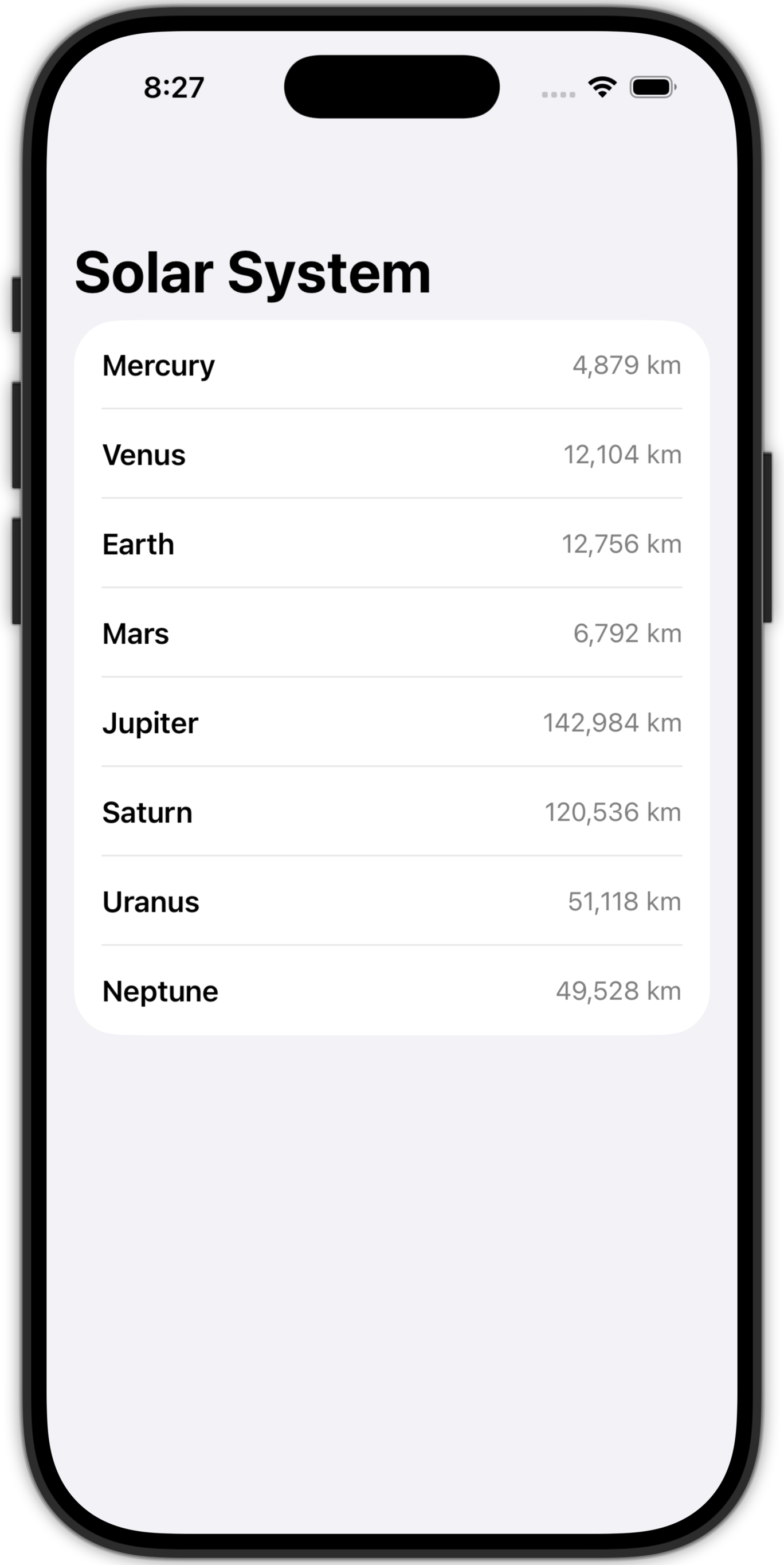
In a SwiftUI app using MVVM, the array lives in the view model as a stored property, and the view iterates over it using ForEach. The key insight is that ForEach is the declarative equivalent of a for-in loop: instead of executing a block of statements for each element, it produces a block of views.
Here is a minimal but complete example using a Planet model.
import Foundationstruct Planet: Identifiable { // MARK: Stored properties let id = UUID() let name: String let diameter: Int // kilometres}
Identifiable conformance is required by ForEach so that SwiftUI can track which view corresponds to which element. Using UUID() as the id gives each instance a guaranteed unique identifier.
The @Observable macro means SwiftUI will automatically re-render any view that reads planets whenever the array changes.
View
ContentView.swift
import SwiftUIstruct ContentView: View { // MARK: Stored properties @State var viewModel = PlanetViewModel() // MARK: Computed properties var body: some View { NavigationStack { List { ForEach(viewModel.planets) { planet in HStack { Text(planet.name) .font(.headline) Spacer() Text("\(planet.diameter.formatted()) km") .foregroundStyle(.secondary) .font(.subheadline) } } } .navigationTitle("Solar System") } }}#Preview { ContentView()}
SwiftUI tracks which properties of the view model are read during rendering and only re-renders the view if those specific properties change.
Comparison
It is worth pausing to compare the two iteration patterns side by side:
Imperative — a for-in loop in a command-line program:
for planet in planets { print(planet.name)}
Declarative — ForEach in a SwiftUI view:
ForEach(viewModel.planets) { planet in Text(planet.name)}
Both iterate over every element in the array, binding each element in turn to the loop variable planet. The difference is in what the body produces: the for-in loop executes statements (side effects like print), while ForEach produces views that SwiftUI assembles into a rendered interface.
This is the heart of SwiftUI’s declarative model. You describe what the interface should look like for each element, and SwiftUI handles how and when to render it.
Summary
Concept
Syntax
Use when…
Access by index
array[i]
You need a specific element at a known position
.first / .last
array.first ?? fallback
You need the first or last element safely
for-in (values)
for item in array
You need every element and not its index
for-in (indices)
for index in array.indices
You need the index, or need to mutate elements
enumerated()
for (i, item) in array.enumerated()
You need both the element and a counter, read-only
ForEach (SwiftUI)
ForEach(array) { item in ... }
You are building a view for each element in a SwiftUI layout